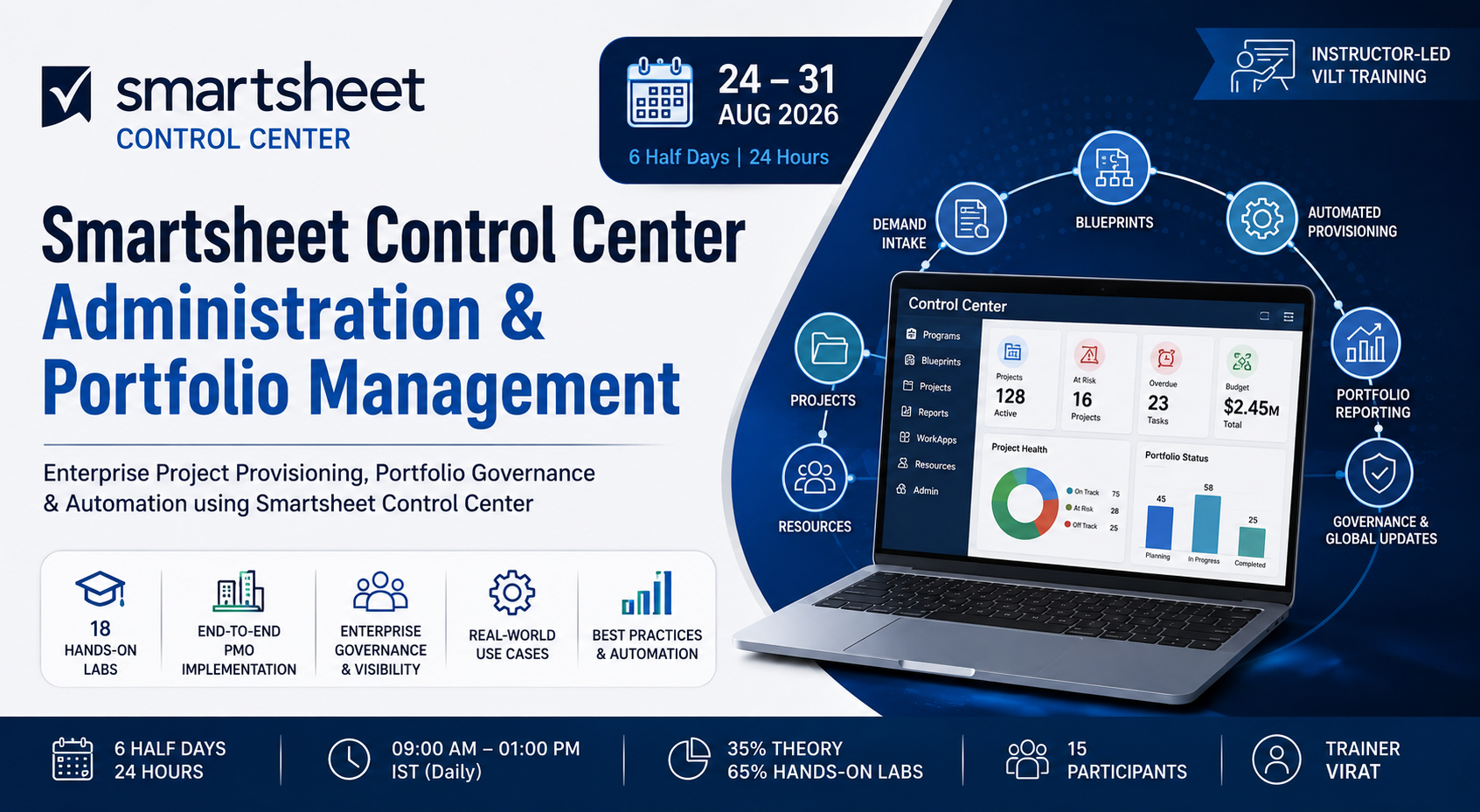
A comprehensive 6-half-day enterprise training program focused on Smartsheet Control Center architecture, standardized project provisioning, portfolio governance, automation, reporting, administration, and enterprise PMO solution design through 18 hands-on labs.
Training Overview
Training Program: Smartsheet Control Center Administration & Portfolio Management
Focus: Enterprise Project Provisioning, Portfolio Governance & Automation using Smartsheet Control Center
Delivery Dates: 24th–31st August 2026
Duration: 6 Half Days / 24 Hours
Timings: 09:00 AM – 01:00 PM IST
Training Mode: Instructor-Led / Virtual Instructor-Led (VILT)
Training Approach: 35% Theory + 65% Hands-on Labs
Trainer: Virat
Training Snapshot
📅 Dates: 24th–31st August 2026
⏱️ Duration: 6 Half Days | 24 Hours
🕘 Timings: 09:00 AM – 01:00 PM IST
👨🏫 Trainer: Virat
🏢 Program: Smartsheet Control Center Administration & Portfolio Management
👥 Participants: 15 Professionals
🎯 Focus Areas:
Control Center Architecture
Blueprint Engineering
Demand Intake & Project Provisioning
Portfolio Reporting & Executive Dashboards
Change Management & Global Updates
Resource Management Concepts
Governance & Program Administration
Project Lifecycle & Archiving
Enterprise PMO Solution Design
🧪 Hands-On Learning: 18 Practical Labs
⭐ Participant Satisfaction: Approximately 4.7 / 5 based on the participant evaluation data provided.
Introduction
From 24th to 31st August 2026, I had the opportunity to deliver the Smartsheet Control Center Administration & Portfolio Management training program for a group of 15 participants.
The program focused on helping participants understand how Smartsheet Control Center can support standardized project delivery, enterprise project provisioning, portfolio visibility, governance, and PMO automation.
Across six half-days, the learning journey progressed from understanding the Control Center architecture to designing Blueprints, configuring Demand Intake, provisioning projects, scaling portfolio operations, implementing governance controls, administering programs, troubleshooting provisioning issues, and designing an end-to-end enterprise PMO solution.
The delivery methodology followed a practical learning model:
Concept → Demonstration → Hands-On Lab → Real-World Scenario
With a 35% theory and 65% hands-on learning approach, participants explored the complete lifecycle of an enterprise Control Center implementation.
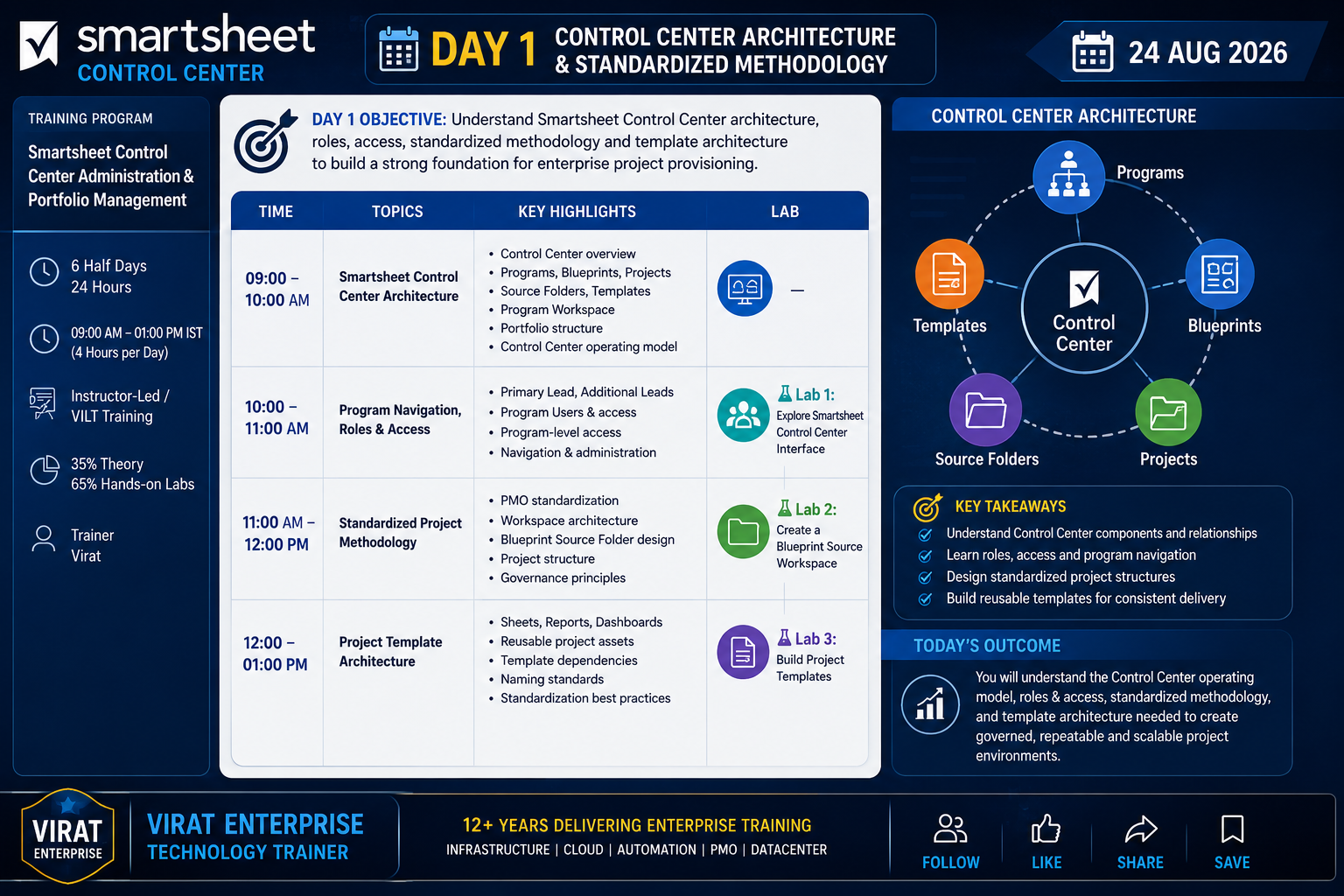
Day 1 – Control Center Architecture & Standardized Methodology
The first day focused on establishing the architectural and operational foundation required to understand how Smartsheet Control Center supports standardized project delivery at scale.
Topics Covered
Smartsheet Control Center Architecture
Participants explored the Control Center operating model and its key components:
Programs and Blueprints
Projects and Source Folders
Templates and reusable project assets
Program Workspace
Portfolio structure
Control Center operating model
Program Navigation, Roles & Access
The session covered important administrative and user roles, including:
Primary Lead
Additional Leads
Program Users
Program-level access
Control Center navigation
Program administration concepts
Standardized Project Methodology
Participants explored the principles behind standardized project delivery:
PMO standardization
Workspace architecture
Blueprint Source Folder design
Project structure
Governance principles
Project Template Architecture
The session covered reusable project assets and template design, including:
Sheets
Reports
Dashboards
Template dependencies
Naming standards
Standardization best practices
Hands-On Labs
Lab 1 – Explore Smartsheet Control Center Interface
Lab 2 – Create a Blueprint Source Workspace
Lab 3 – Build Project Templates
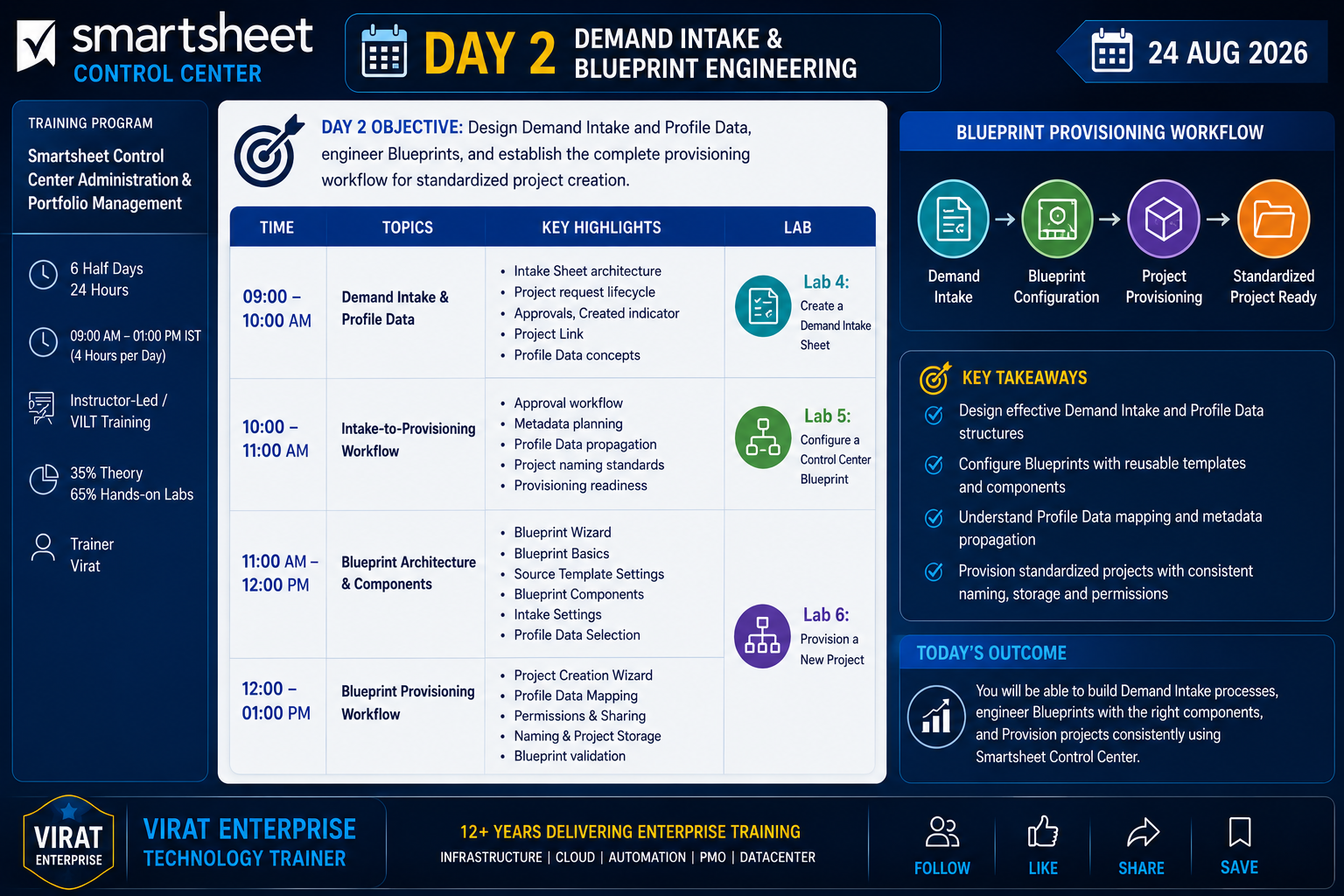
Day 2 – Demand Intake & Blueprint Engineering
Day 2 focused on transforming project requests into standardized, governed, and provision-ready enterprise projects.
Topics Covered
Demand Intake & Profile Data
Key concepts included:
Intake Sheet architecture
Project request lifecycle
Approval workflows
Created indicators
Project Links
Profile Data concepts
Intake-to-Provisioning Workflow
Participants explored how intake information flows into project provisioning through:
Approval workflows
Metadata planning
Profile Data propagation
Project naming standards
Provisioning readiness
Blueprint Architecture & Components
The session covered the technical building blocks of a Control Center Blueprint:
Blueprint Wizard
Blueprint Basics
Source Template Settings
Blueprint Components
Intake Settings
Profile Data Selection
Blueprint Provisioning Workflow
Participants reviewed the project creation workflow, including:
Project Creation Wizard
Profile Data Mapping
Permissions and Sharing
Project naming
Project storage
Blueprint validation
Hands-On Labs
Lab 4 – Create a Demand Intake Sheet
Lab 5 – Configure a Control Center Blueprint
Lab 6 – Provision a New Project
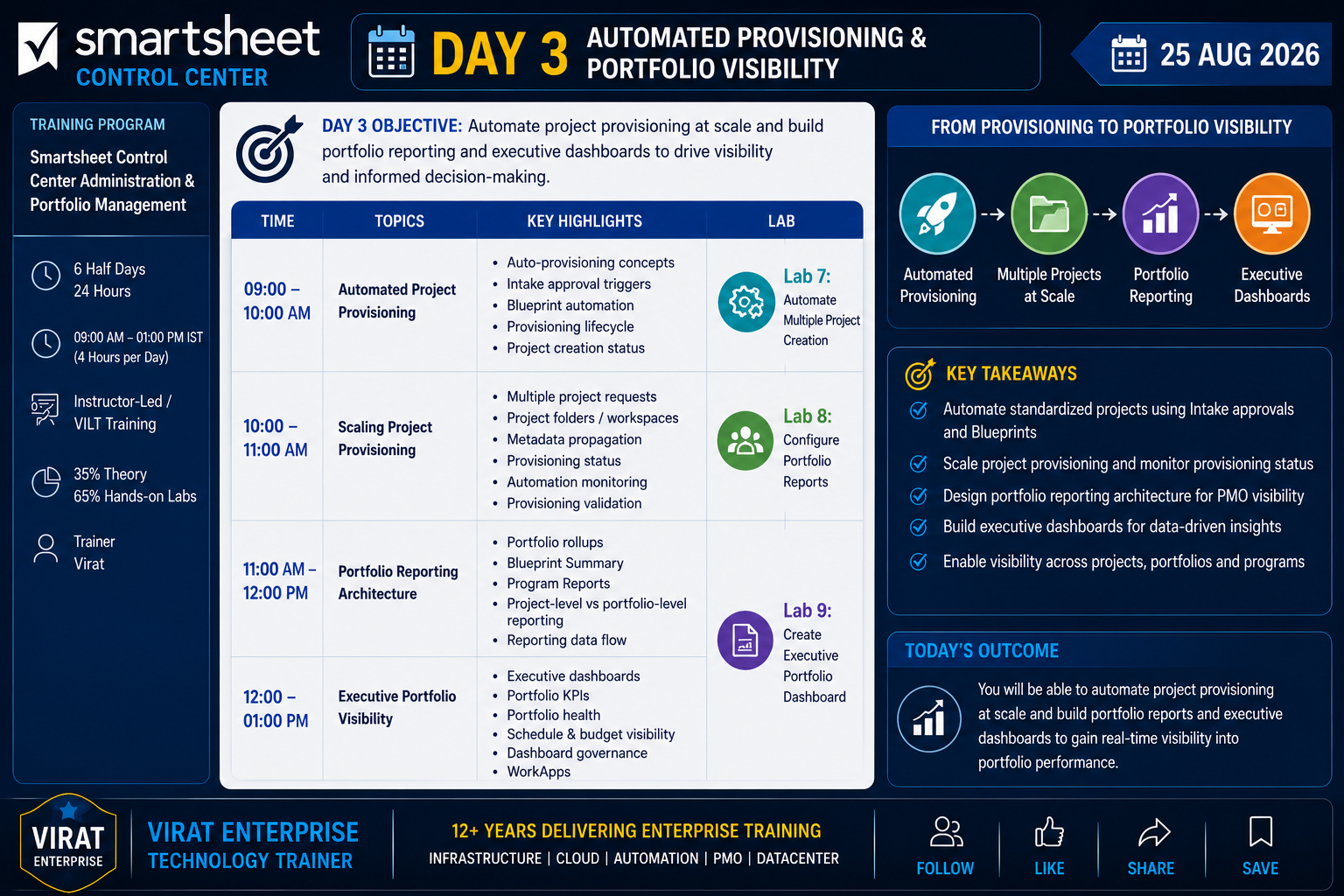
Day 3 – Automated Provisioning & Portfolio Visibility
Day 3 expanded the learning journey from individual project creation to automation, scale, portfolio reporting, and executive visibility.
Topics Covered
Automated Project Provisioning
The session covered:
Auto-provisioning concepts
Intake approval triggers
Blueprint automation
Provisioning lifecycle
Project creation status
Scaling Project Provisioning
Participants explored enterprise-scale provisioning through:
Multiple project requests
Project folders and workspaces
Metadata propagation
Provisioning status
Automation monitoring
Provisioning validation
Portfolio Reporting Architecture
The reporting discussion included:
Portfolio rollups
Blueprint Summary
Program Reports
Project-level reporting
Portfolio-level reporting
Reporting data flow
Executive Portfolio Visibility
Participants explored portfolio visibility through:
Executive dashboards
Portfolio KPIs
Portfolio health
Schedule and budget visibility
Dashboard governance
WorkApps
Hands-On Labs
Lab 7 – Automate Multiple Project Creation
Lab 8 – Configure Portfolio Reports
Lab 9 – Create Executive Portfolio Dashboard
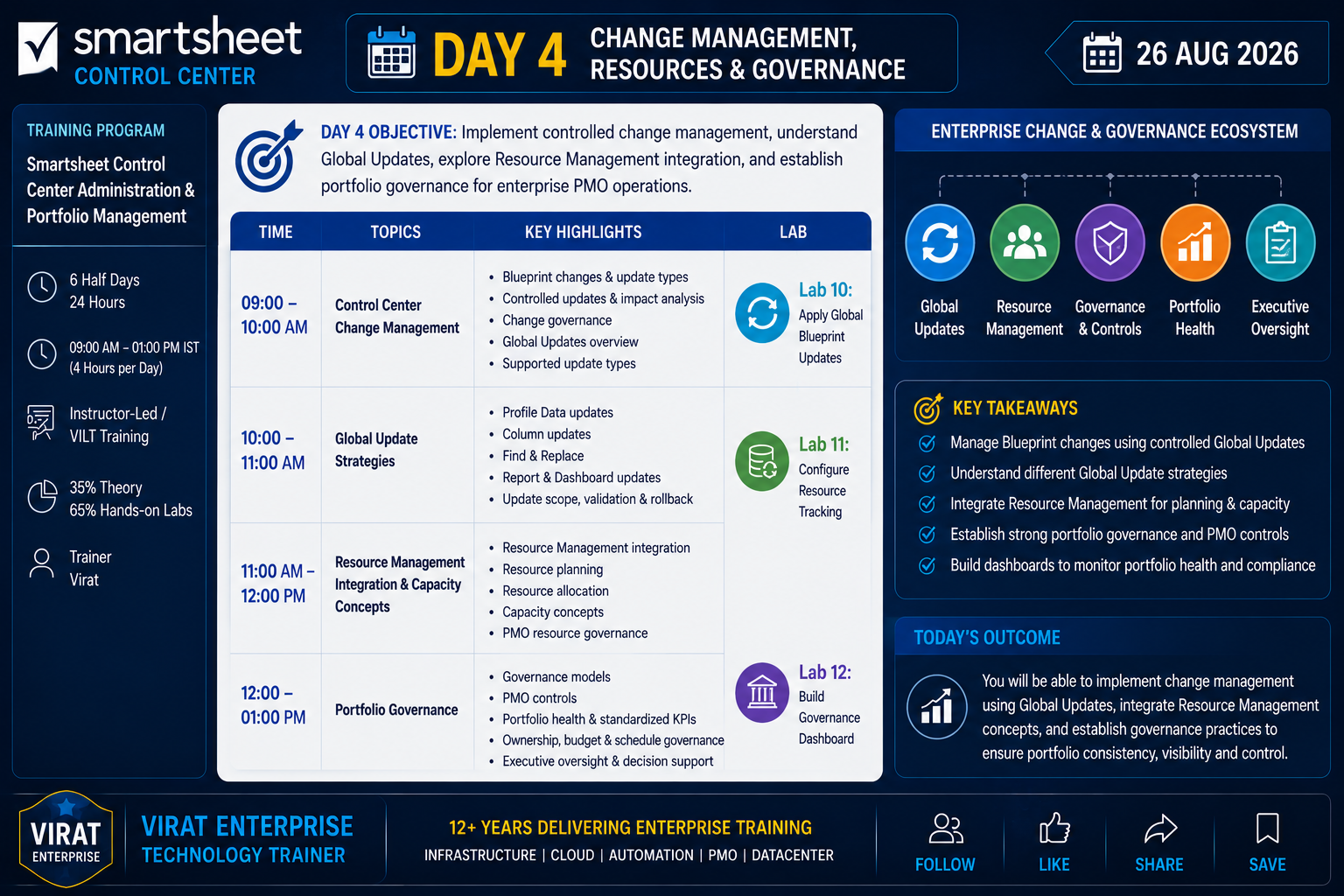
Day 4 – Change Management, Resources & Governance
Day 4 focused on managing change across standardized projects while establishing resource and portfolio governance practices.
Topics Covered
Control Center Change Management
Key areas included:
Blueprint changes
Controlled updates
Impact analysis
Change governance
Global Updates
Supported update types
Global Update Strategies
Participants explored different update approaches involving:
Profile Data updates
Column updates
Find and Replace
Report updates
Dashboard updates
Update scope
Validation and rollback considerations
Resource Management Integration & Capacity Concepts
The session introduced:
Resource Management integration
Resource planning
Resource allocation
Capacity concepts
PMO resource governance
Portfolio Governance
The governance discussion covered:
Governance models
PMO controls
Portfolio health
Standardized KPIs
Ownership models
Budget and schedule governance
Executive oversight
Hands-On Labs
Lab 10 – Apply Global Blueprint Updates
Lab 11 – Configure Resource Tracking
Lab 12 – Build Governance Dashboard
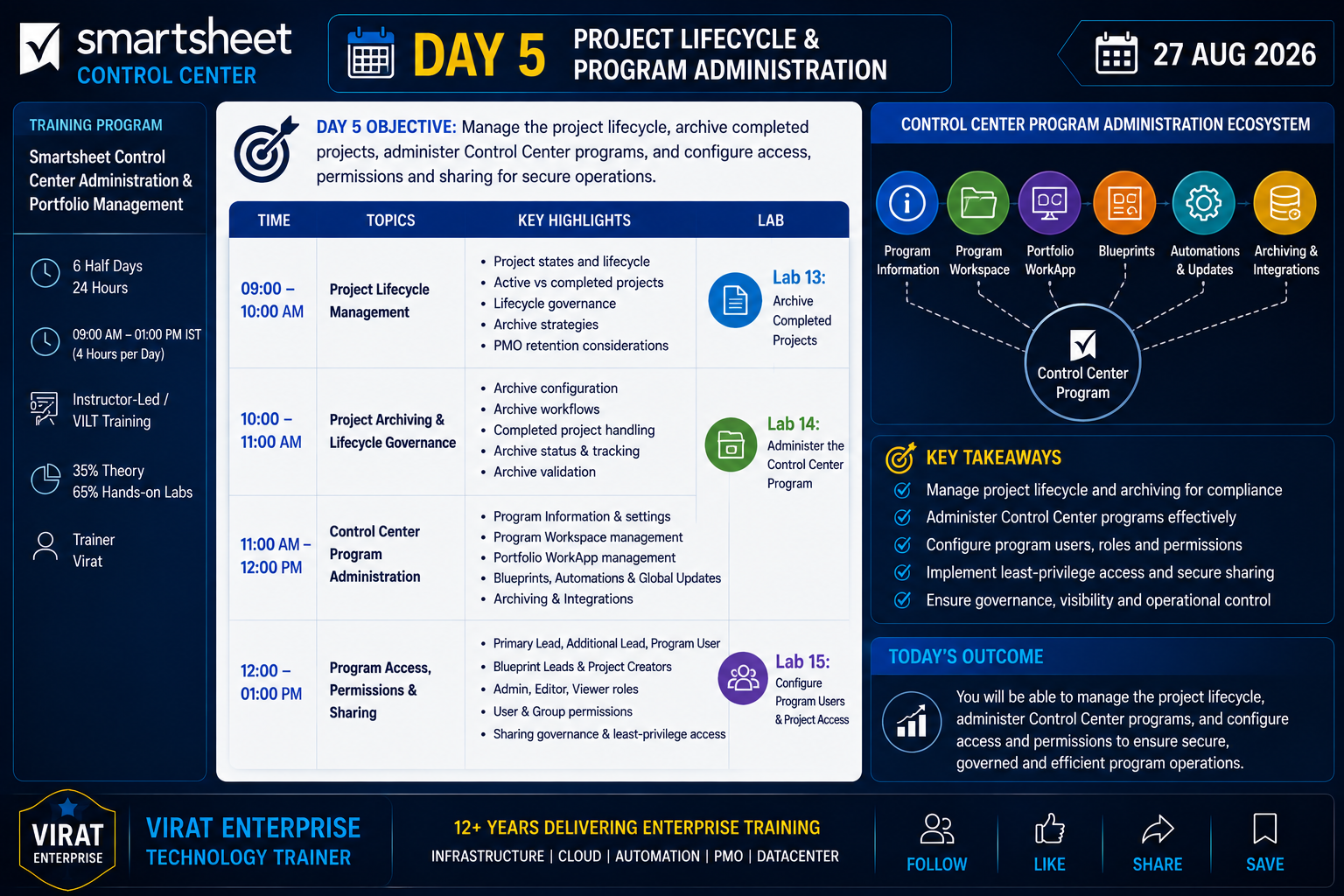
Day 5 – Project Lifecycle & Program Administration
Day 5 focused on the operational side of Smartsheet Control Center, including lifecycle management, archiving, program administration, and access governance.
Topics Covered
Project Lifecycle Management
Participants covered:
Project states
Active and completed projects
Lifecycle governance
Archive strategies
PMO retention considerations
Project Archiving & Lifecycle Governance
The session included:
Archive configuration
Archive workflows
Completed project handling
Archive status
Archive validation
Control Center Program Administration
Participants explored administrative capabilities across:
Program Information
Program Workspace
Portfolio WorkApp
Blueprints
Automations
Global Updates
Archiving
Integrations
Program Access, Permissions & Sharing
Access governance included:
Primary Lead
Additional Lead
Program User
Blueprint Leads
Project Creator
Admin, Editor, and Viewer roles
User and Group permissions
Sharing governance
Least-privilege access
Hands-On Labs
Lab 13 – Archive Completed Projects
Lab 14 – Administer the Control Center Program
Lab 15 – Configure Program Users & Project Access
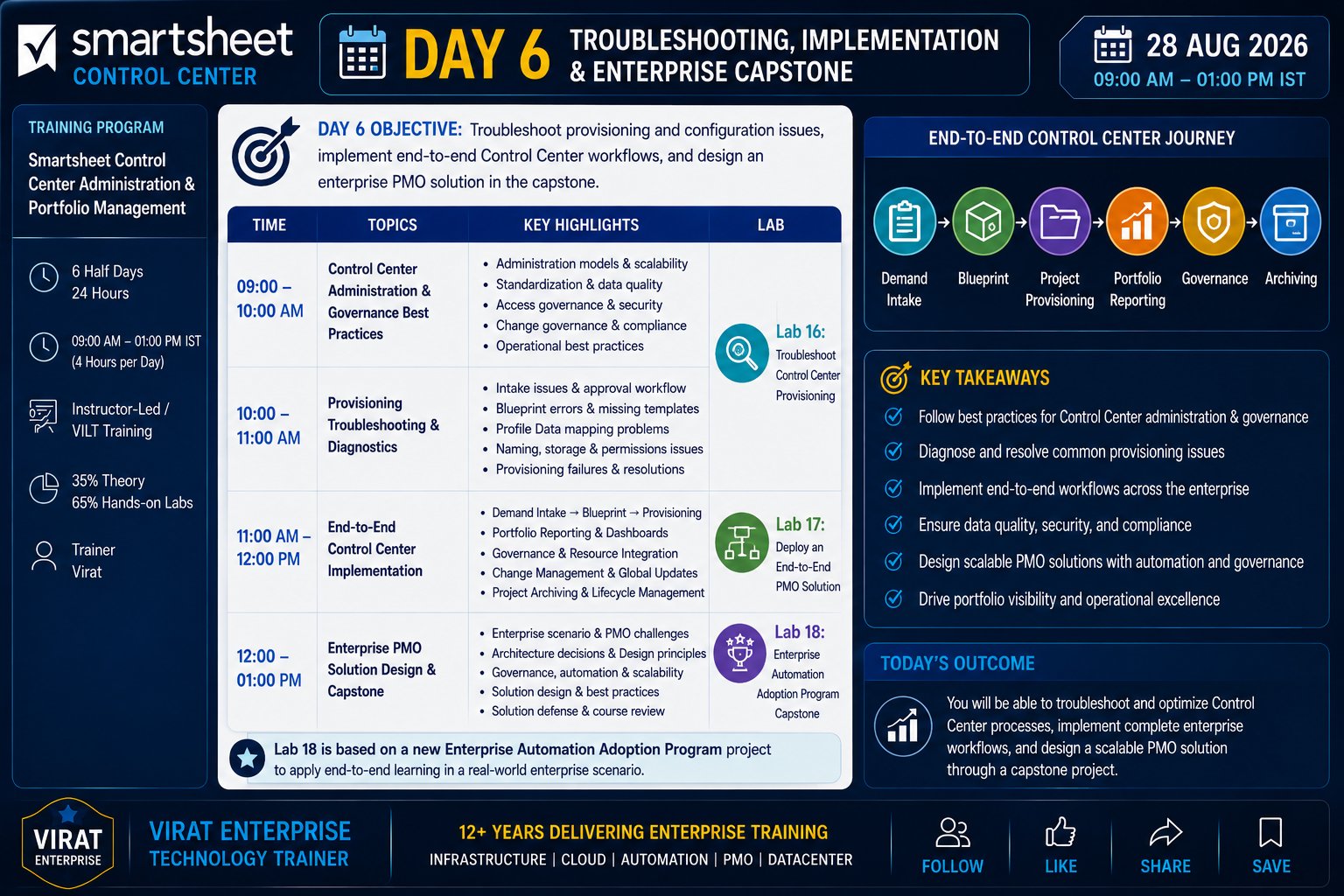
Day 6 – Troubleshooting, Implementation & Enterprise Capstone
The final day brought together administration, troubleshooting, implementation, and enterprise solution design.
Topics Covered
Control Center Administration & Governance Best Practices
The session focused on:
Administration models
Scalability
Standardization
Data quality
Access governance
Change governance
Operational best practices
Provisioning Troubleshooting & Diagnostics
Participants examined common operational issues involving:
Intake issues
Approval and Created status
Blueprint issues
Missing templates
Profile Data mapping
Naming and storage
Permissions
Provisioning failures
End-to-End Control Center Implementation
The implementation workflow connected:
Demand Intake → Blueprint → Project Provisioning → Portfolio Reporting → Governance → Change Management → Archiving
Enterprise PMO Solution Design & Capstone
The program concluded with an enterprise-focused scenario covering:
Architecture decisions
PMO governance
Automation program lifecycle
Solution design
Solution defense
Course review
Hands-On Labs
Lab 16 – Troubleshoot Control Center Provisioning
Lab 17 – Deploy an End-to-End PMO Solution
Lab 18 – Enterprise Automation Adoption Program Capstone
The final capstone used a new Enterprise Automation Adoption Program project, allowing participants to apply the concepts and workflows covered throughout the training in a broader enterprise scenario.
Hands-On Learning Journey
The 18 hands-on labs were designed as a progressive learning journey rather than isolated exercises.
Days 1–2 – Build the Foundation 🧱
Source Workspace → Templates → Intake → Blueprint → Provisioning
Day 3 – Scale and Visualize 🚀
Automation → Multiple Projects → Portfolio Reports → Executive Dashboard
Day 4 – Change and Govern 🔄
Global Updates → Resources → Governance
Day 5 – Operate and Administer 🏢
Archiving → Program Administration → Access & Permissions
Day 6 – Troubleshoot and Demonstrate Mastery 🛠️
Troubleshooting → End-to-End Deployment → Enterprise Automation Adoption Program Capstone
The complete learning progression followed:
Learn → Configure → Provision → Scale → Report → Govern → Administer → Troubleshoot → Deploy → Design
Participant Feedback
The program received strong and consistently positive feedback from 15 participants across the training days.
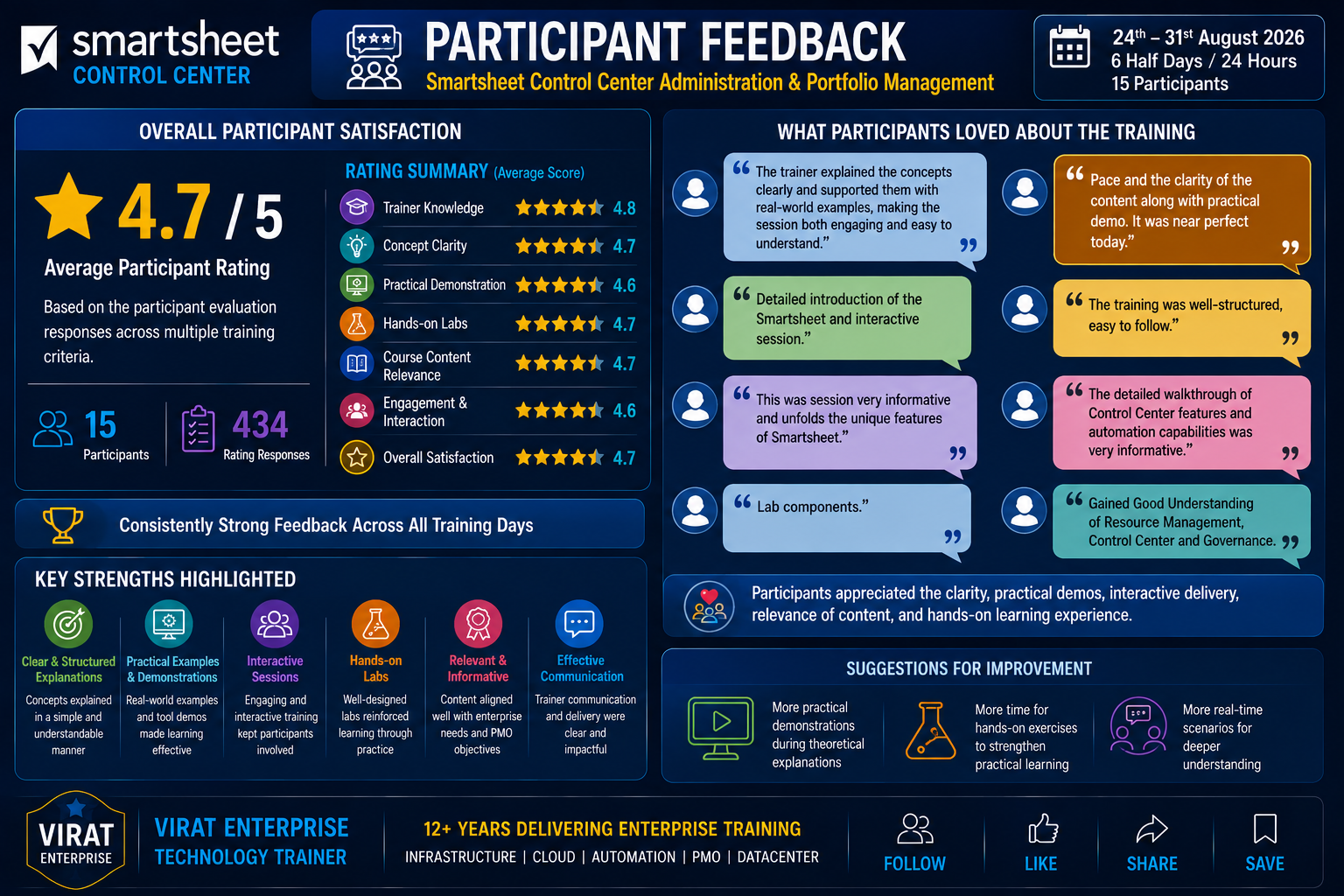
The feedback highlighted several recurring strengths:
Clear and structured explanations
Practical examples and demonstrations
Interactive sessions
Relevant training material
Hands-on lab components
Effective communication
Detailed coverage of Control Center and portfolio concepts
Participant feedback included:
"The trainer explained the concepts clearly and supported them with real-world examples, making the session both engaging and easy to understand."
"Detailed introduction of the Smartsheet and interactive session."
"The training was well-structured, easy to follow."
"This was session very informative and unfolds the unique features of Smartsheet."
"Pace and the clarity of the content."
"The brief about control center."
"Lab components."
"Very informative session."
These responses reflected a recurring appreciation for the clarity of explanation, practical context, interactive delivery, informative sessions, and hands-on learning components.
Training Outcomes
By the end of the program, participants were able to:
✅ Understand the Smartsheet Control Center architecture and operating model
✅ Design standardized project methodologies using Source Workspaces and reusable templates
✅ Configure Demand Intake and Profile Data workflows
✅ Build and manage Control Center Blueprints
✅ Provision standardized projects through controlled workflows
✅ Scale project creation across enterprise portfolio environments
✅ Build portfolio reports and executive dashboards
✅ Apply Global Updates using controlled change management practices
✅ Understand Resource Management integration and capacity concepts
✅ Establish PMO governance and portfolio visibility
✅ Manage project lifecycle and archiving workflows
✅ Administer Control Center programs and program access
✅ Configure permissions and least-privilege access models
✅ Troubleshoot common provisioning and configuration issues
✅ Apply Control Center concepts through an enterprise automation capstone scenario
Final Thoughts
Enterprise project management becomes significantly more effective when standardized processes can be translated into repeatable, governed, and scalable delivery models.
This program was designed around that principle—connecting architecture, standardization, automation, provisioning, portfolio visibility, governance, administration, and troubleshooting into one structured learning journey.
The combination of instructor-led discussions, demonstrations, and 18 hands-on labs enabled participants to move beyond understanding individual Smartsheet Control Center features and explore how those capabilities fit together within an enterprise PMO operating model.
The objective throughout the program was to connect technology capabilities with practical implementation:
Standardize → Provision → Scale → Govern → Operate
Thank you to all 15 participants for their engagement, questions, and participation throughout the training journey. 🚀
About the Trainer
Virat is an Enterprise Technology Trainer and Consultant with 12+ years of experience delivering consulting-led training programs across Enterprise Platforms, Project and Portfolio Management, Cloud, Virtualization, Infrastructure, Automation, and Datacenter Technologies.
His training approach combines structured concepts, practical demonstrations, hands-on labs, and real-world enterprise scenarios to help professionals connect technology capabilities with practical implementation and operational outcomes.
About the author
- Enterprise Infrastructure Consultant and Corporate Trainer with 12+ years of experience delivering hands-on training across VMware, Cloud, Linux, Kubernetes, Automation, Datacenter Technologies, Hyperconverged Infrastructure and AI Edge Computing. Passionate about helping professionals bridge the gap between theory and real-world enterprise implementations through practical labs, industry use cases and certification-focused learning.
Comments
Join the discussionNo comments yet. Be the first to comment.